
I Have Superfast Internet, So Why Does Teams Still Struggle When I Work from Home?
I Have Superfast Internet, So Why Does Teams Still Struggle When I Work from Home?
Internet providers love showing one big number: 150, 500, 900 or even 1000 Mbps.
And of course, 1 Gbps sounds even more impressive. Almost heroic.
The problem is that this big number usually refers mainly to download speed.
But your daily pain with Microsoft Teams, video calls, CCTV cameras, cloud backups, VPN and file uploads is a slightly different story.
So, buckle up.
This article is about download, upload, ping, latency, online shopping, CCTV, smart devices and why your washing machine probably does not need fibre broadband.
The internet works in two directions
Surprise, right?
The internet is not just about downloading. It works in two directions.
We have:
Download — data coming to you.
Netflix, YouTube, websites, Windows updates in the middle of a meeting, file downloads, product images in online shops.
Upload — data going from you to the internet.
Your camera in Teams, your voice, shared screen, photos you send, cloud backup, files going to SharePoint, VPN traffic, or your CCTV camera constantly telling the world that the cat has knocked over another plant pot.
And this is where the problem starts.
An offer saying “500 Mbps” often means 500 Mbps down, but upload may be 30, 50, 100 or 150 Mbps, depending on the provider and technology.
That can still be a very good connection. But you need to know what you are actually buying.
Because “500 Mbps internet” does not always mean 500 Mbps in both directions.
Mbps vs MB/s — one small letter, a big difference
Here is where marketing gets a small poke in the ribs.
Mbps means megabits per second.
MB/s means megabytes per second.
They are not the same thing.
In simple terms:
1 byte = 8 bits
So 100 Mbps does not mean you download files at 100 MB/s.
In ideal conditions, 100 Mbps gives you around 12.5 MB/s before overheads and real-world losses.
So when you see “1 Gbps”, do not shout:
“Great, I will get 1 GB/s!”
No, you will not.
1 Gbps is around 125 MB/s in ideal conditions.
Still fast. Just not magic.
Providers know that most people do not pay attention to this difference. And marketing is very happy to use that.
Why do adverts mostly show download speed?
Because the bigger number looks better.
“500 Mbps” sounds much nicer than:
“500 Mbps download, but upload is much lower, please check the small print.”
That second version does not exactly sell dreams.
For the provider, an asymmetric connection — high download and lower upload — often makes technical and business sense. Most home users still download more data than they upload. Watching films, browsing websites and downloading updates mainly use download bandwidth.
It is not always a scam.
Very often, it is simply a clever sales model where the biggest number looks best.
But as a customer, you have the right to know what you are buying.
So before signing a contract, ask two questions, not one:
What is the download speed?
What is the upload speed?
Because the internet works in two directions.
And so do your video calls.
For Netflix? You probably do not need 1 Gbps
This is the funny part.
Someone tries to sell you gigabit internet, while your film is streaming at just a few or a dozen Mbps.
In practical terms:
| Service / quality | Approximate bandwidth needed |
|---|---|
| Netflix HD / Full HD | around 5–8 Mbps |
| Netflix 4K | around 15–25 Mbps |
| YouTube, Spotify, websites | often even less |
A faster package makes sense when several people at home are watching, gaming, working, downloading updates and backing up files to the cloud at the same time.
But if you are sitting alone with a cup of tea and a TV series, and your internet is mainly used for Netflix, YouTube, email and online shopping, paying for the top package may not make much sense.
The film will not look better just because you have 1 Gbps instead of 150 Mbps, as long as the streaming requirements are already met.
Your fridge will not thank you either.
What about online shopping?
This may be disappointing.
One common question is:
“Will faster internet make online shopping faster?”
Short answer: usually no.
Or: it depends on what exactly you are doing.
If you are browsing products, adding items to the basket and placing an order, the shop server still responds at its own speed. Your 1 Gbps internet will not force Amazon, Allegro or any other shop to load faster.
It is a bit like buying a superfast delivery van while the warehouse still packs parcels at the speed of a sleepy turtle.
When can faster internet help?
If the shop has lots of large images — furniture, electronics, clothes, 360-degree photos — then higher download speed can help images load faster.
But the difference between 100 Mbps and 500 Mbps may still be small, because the real limit could be the shop’s server, your browser, your phone, Wi-Fi, advertising scripts or tracking scripts on the page.
Faster internet also helps when you buy large digital files: games, software, video courses or ISO images.
Then yes, faster download helps.
But that is more downloading than traditional shopping.
When will faster internet not help much?
When the shop website is slow because the server is slow.
When it is Black Friday and the servers are falling apart. Even 10 Gbps will not make you the chosen one. You will be pressing refresh like everyone else.
When you are paying by card. The data sent to the bank is tiny. It is not a 4K movie. Even a slower connection can handle it easily if it is stable.
So no, faster internet will not automatically make you shop more quickly.
Unless you are shopping for internet.
But that is a different story.
Upload — the quiet killer of Teams calls
Upload is like the introvert at a party.
Nobody talks about it much, but then it turns out the whole party depends on it.
Teams, Zoom, WhatsApp and Telegram all need not only download but also upload.
During a video call, you are not only receiving video from other people. You are also sending your face, your voice and sometimes your shared screen.
If your upload is weak or unstable, others may see you like footage from a 2007 webcam: one frame per second, pixels instead of a face, and audio that sounds like it came through a tunnel.
Then the app politely says:
“Your connection is unstable.”
Human translation:
“Something is not coping. It may be upload, Wi-Fi, or your router quietly asking for retirement.”
A single video call usually does not need gigabits.
It needs stable upload.
That is the key.
Ping — why conversations can feel painful
Ping is the reaction time of your connection.
It shows how quickly your device can send a small message to a server and get a response.
Simple example:
You say “hello” and hear “hello” back immediately — low ping. The conversation feels natural.
You say “hello” and the other person answers one second later — high ping. You start talking over each other, everything feels strange, and everyone wonders whether the internet has returned from holiday using dial-up.
Practical guide:
| Ping | What it feels like |
|---|---|
| 10–30 ms | very good |
| 30–60 ms | good |
| 60–100 ms | delays may be noticeable |
| over 100 ms | welcome to conversations where everyone replies to the previous sentence |
You can have a 1 Gbps motorway, but if the traffic lights react slowly, you are still stuck.
And shouting at the laptop does not help.
I checked.
Latency — same story, different name
Latency means delay.
In practice, when a normal user says “ping”, they often mean latency.
Even simpler:
Download — how wide the road is towards you.
Upload — how wide the road is away from you.
Ping / latency — how fast the traffic lights react.
A wide road does not fix bad traffic lights.
And huge download speed does not fix high ping.
Number of devices — this is where the fun starts
The days when one computer was the only device connected to the internet are long gone.
Today, one home network may have:
a phone, another phone, a laptop, a tablet, a Smart TV, a console, a printer, a camera, an alarm system, a smartwatch, smart speakers, a robot vacuum cleaner, a washing machine, a fridge, a thermostat, a plant moisture sensor and probably one day an intelligent towel rail.
I am joking about the towel rail.
For now.
Each device sends and receives something. Individually, usually not much. But when you have 20 or 30 of them, the router starts sweating.
A real-life example:
- one person is watching Netflix,
- another is working on Teams,
- a child is gaming online,
- a phone is backing up photos to the cloud,
- the TV is downloading an update,
- cameras are sending video to an app,
- a laptop is syncing OneDrive,
- the washing machine checks for a new washing programme, because apparently laundry also needs firmware,
- the fridge talks to an app because the milk situation is now critical.
At that point, it is no longer only about download speed.
It is about whether the whole connection, router and Wi-Fi can handle the entire home without collapsing.
CCTV and cameras — masters of eating upload
CCTV is a perfect example of why upload matters.
If cameras record locally to a recorder at home or in the office, the internet is not needed for the recording itself.
But if you want to watch the camera remotely on your phone, laptop or through the manufacturer’s app, your network has to send that video out to the internet.
That uses upload.
One camera? Usually fine.
Several HD or 4K cameras, remote viewing, cloud backup and an app running in the background?
Suddenly upload becomes very real.
Example:
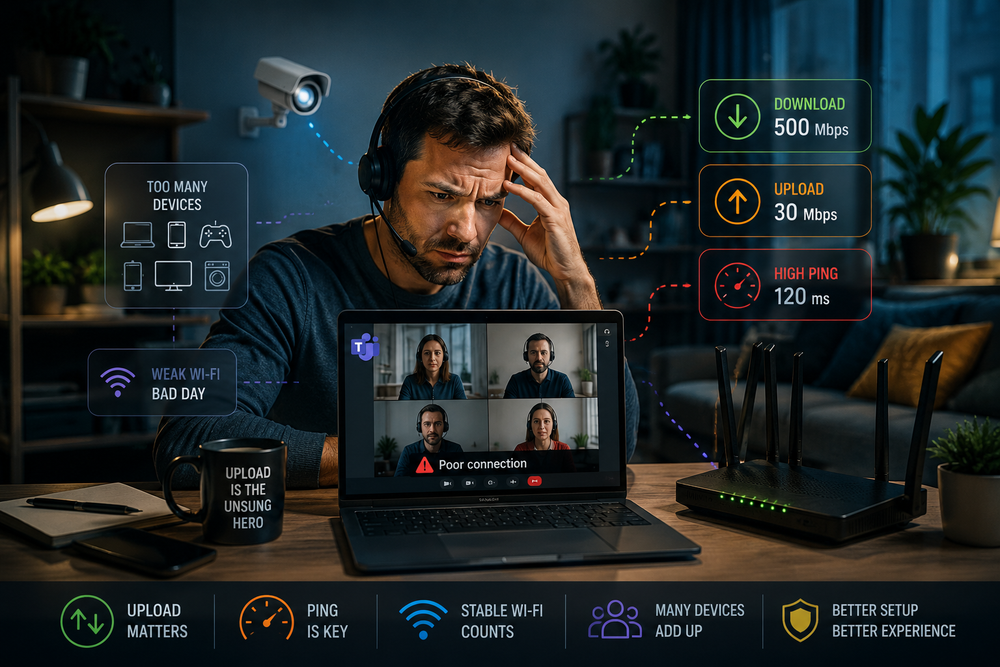
You have 500 Mbps download, but only 30 Mbps upload.
Netflix works beautifully.
Websites open quickly.
Downloads feel fast.
But when several cameras start sending video to the cloud, or someone watches CCTV remotely, upload can become heavily loaded.
Then Teams shows:
“Your connection is unstable.”
But in reality, the cameras have just eaten a large part of your upload.
The advert said “500 MEGA”.
Yes, it did.
Downstream.
Why 1 Gbps does not solve every problem
Because not every internet problem is a speed problem.
Sometimes the problem is:
- a weak router,
- poor Wi-Fi,
- too much distance from the router,
- interference from neighbours,
- an old laptop or phone,
- provider congestion in the evening,
- high ping,
- an unstable connection,
- low upload,
- too many devices at once,
- cloud backups running in the background,
- cameras sending video to the cloud.
Buying a more expensive package will not fix a weak router.
That is like replacing the engine in a car with three wheels.
More power, but it still drives strangely.
When is it worth paying for faster internet?
Paying more can make sense if:
- there are many people and many devices at home,
- you often download large files,
- you game and download huge game updates,
- you work with large files in the cloud,
- you run online backups,
- you have CCTV and want remote access,
- you have many video calls,
- you work through VPN and do not want to throw your laptop at the wall,
- you run a small business from home.
Then a faster package may make sense.
But still, ask about upload, ping and stability.
Do not buy only the biggest number.
Buy the solution that matches your real use.
When is it not worth overpaying?
It may not be worth overpaying if:
- you mainly watch Netflix and YouTube,
- you use email, banking and online shopping,
- you have a few devices but no heavy usage,
- you do not upload large files,
- you do not have cameras sending video to the cloud,
- you do not work daily over VPN,
- the advert impressed you, but realistically you will not use even half of the package.
For many homes, stable 150–300 Mbps with a good router and good Wi-Fi may be a better choice than expensive 1 Gbps connected to a plastic box from the provider that barely handles half the house.
What should you check before choosing an offer?
Before signing a contract, check:
- what the download speed is,
- what the upload speed is,
- whether the speed is guaranteed, minimum or only maximum,
- what type of connection it is: fibre, cable, 5G, ADSL,
- whether the provider’s router is any good,
- whether you can use your own router,
- how stable the connection is in the evening,
- whether there are data limits,
- what the ping is,
- how many people will use the internet,
- how many devices will be connected,
- whether there are CCTV cameras,
- whether someone works from home,
- whether someone uses VPN,
- whether someone regularly uploads large files to the cloud.
The biggest number in the advert does not always mean the best experience.
Sometimes it just means the best advert.
A simple example
Offer A:
- 1 Gbps download,
- 50 Mbps upload,
- weak router,
- unstable Wi-Fi.
Offer B:
- 300 Mbps download,
- 300 Mbps upload,
- good router,
- stable Wi-Fi.
For many people, Offer B will work better in daily life.
Especially for remote work, Teams calls, file uploads, backups and remote access to cameras.
Why?
Because the internet is not only download.
The advert may not say that.
I will.
Summary
Adverts like to simplify reality, and internet providers love one big number.
But that number often mainly means download.
In real life, upload, ping, stability, router quality, Wi-Fi and the fact that your fridge really does not need fibre broadband all matter too.
You do not always need 1 Gbps for Netflix.
You do not need it for online shopping either — the shop server can still slow you down.
For remote work, you need good upload, low ping and stability, not only a huge number in an advert.
Do not get blinded by gigabit internet if your Wi-Fi is weak, your router is old and you are paying for something you will never use.
And just to be clear: fast internet is not bad. I like fast internet. The problem starts when you pay for the biggest number in the advert, but nobody tells you that your real problems may be somewhere else: upload, Wi-Fi, router, ping or the fact that half the house is syncing to the cloud.
The best internet is not the one with the biggest number in the top corner of the leaflet.
The best internet is the one that fits your home, your work, your devices and your patience.
Because truly fast internet is the one that does not make you swear during a Teams call with your boss.
Now go and check how much upload you really have.